Que una cámara de seguridad se desconecte no siempre significa que esté averiada. Puede que la aplicación no esté disponible mientras la grabación local continúa. Puede que la nube esté caída mientras el NVR sigue guardando vídeo. Una cámara Wi-Fi puede perder la señal porque se ha movido el router, no porque haya cambiado la calidad del producto. Los compradores, instaladores y distribuidores necesitan una lista de verificación clara que les permita diferenciar entre fallos de la cámara y problemas de alimentación, red, aplicación, grabador o entorno.
Primero, defina qué significa “fuera de línea”.
Compruebe el síntoma antes de revisar el hardware.
Antes de reemplazar el hardware, compruebe qué es lo que realmente no funciona. ¿Falta la vista en directo en la aplicación? ¿El NVR ya no recibe vídeo? ¿Se retrasan las notificaciones push? ¿Aún se puede acceder a la reproducción local? Las respuestas a estas preguntas determinarán el siguiente paso.
Una sola capa de cámara no define todo el sistema.
Jortan describe las cámaras IP como dispositivos que capturan imágenes, comprimen vídeo y envían las grabaciones a través de una red IP a un NVR o sistema relacionado. Eso significa IP opciones de cámara Depende de la cámara, la fuente de alimentación, la ruta de red, la grabadora, la configuración de almacenamiento, la cuenta de la aplicación y, a veces, el acceso a la nube. Cualquiera de estos factores puede provocar que la cámara aparezca como desconectada.
8 causas para revisar en orden práctico
Comencemos con los problemas de alimentación y conexión local.
El siguiente orden funciona porque comienza con la disponibilidad básica antes de pasar a la configuración. Además, ayuda a evitar culpar al proveedor equivocado cuando el problema se debe a la alimentación eléctrica, el diseño de la red o las condiciones del sitio.
1. Fuente de alimentación: compruebe el adaptador, el conmutador PoE, la batería, la carga solar, el enchufe, la recuperación de energía después de los cortes.
2. Señal WiFi: la distancia, las paredes, los estantes metálicos, la ubicación del enrutador y las interferencias pueden debilitar una cámara WiFi después de la instalación.
3. Conflicto de DHCP o IP: dos dispositivos que utilizan la misma dirección, cambios en la configuración del enrutador o un nuevo segmento de red pueden interrumpir la conexión de la cámara.
4. Carga del enrutador: demasiados dispositivos conectados, una conexión de subida débil o un enrutador de gama baja pueden tener problemas con múltiples transmisiones de vídeo.
Finalizar con Firmware, Ancho de banda y Entorno
5. Versión del firmware y de la aplicación: el emparejamiento, la reproducción, las notificaciones push y el comportamiento de reconexión pueden cambiar después de las actualizaciones.
6. Ancho de banda y tasa de bits: la alta resolución, la alta velocidad de fotogramas y el ruido nocturno pueden sobrecargar el WiFi, el NVR o la visualización remota.
7. Conexión PoE o por cable: los cables largos, los conectores débiles, la presencia de agua en la unión o un conmutador sobrecargado pueden provocar la desconexión de una cámara IP cableada.
8. Temperatura o entrada de agua: la carcasa exterior, el sellado del cable, el ángulo del soporte y la ubicación del adaptador de corriente afectan la estabilidad a largo plazo.
Cómo saber si la grabación continúa
Que la aplicación esté sin conexión no significa que se hayan perdido las grabaciones.
Se debe verificar el estado sin conexión con el almacenamiento. Extraiga un clip de la tarjeta micro SD, NVR, DVR o grabadora local antes de declarar la evidencia perdida. Si la grabación local continúa, el problema podría estar relacionado con el acceso remoto, el inicio de sesión en la aplicación, el servicio en la nube o la conexión del enrutador. Si no existe ningún clip local, verifique la alimentación, el medio de almacenamiento, las reglas de sobrescritura y la programación de grabación.
Los paquetes de grabación simplifican la ruta de prueba.
Para proyectos que necesitan registro centralizado, un JT-8276-8PXM Otro paquete de grabadora puede reducir la confusión, ya que el estado de la cámara, la alimentación PoE y la grabación NVR se gestionan en una única cadena. Para puntos inalámbricos más pequeños, confirme la capacidad de la tarjeta, el comportamiento de sobrescritura y la reproducción de la aplicación en la muestra aprobada.
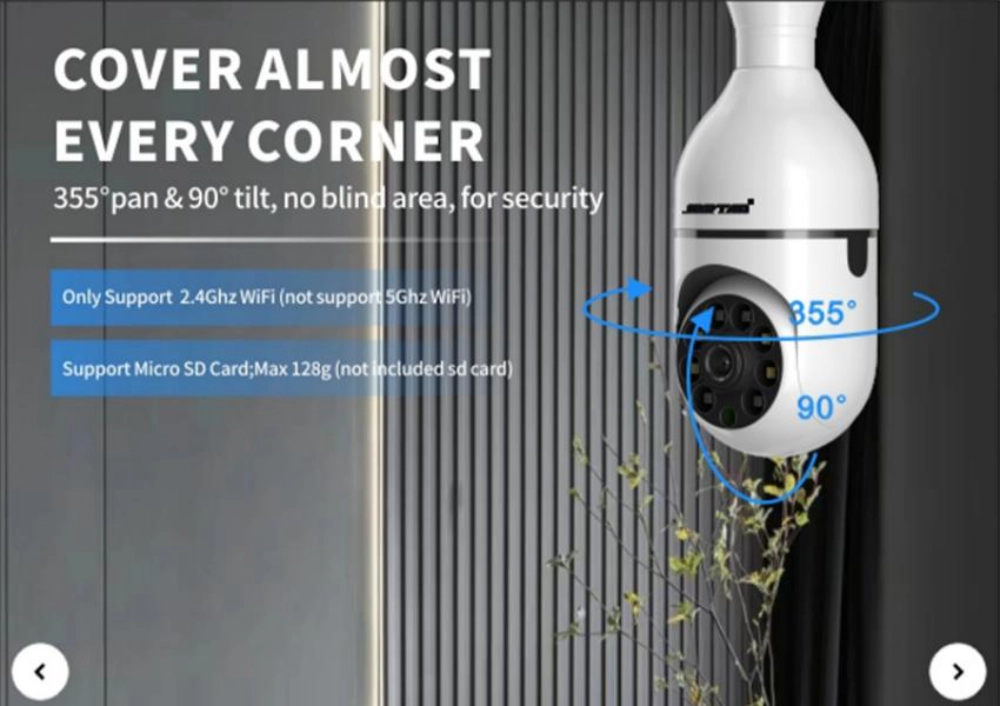
Cómo el diseño de la instalación previene la mayoría de los problemas fuera de línea
Muchos problemas de desconexión de las cámaras se producen durante la instalación, no después de meses de funcionamiento. Un sistema que funciona correctamente en una sala de exposición puede comportarse de forma diferente al instalarse detrás de paredes de hormigón, con cables largos, al aire libre o en lugares con suministro eléctrico inestable.
Para las cámaras WiFi, la planificación de la instalación debe incluir una prueba de señal antes del montaje final. La señal más potente no siempre está disponible en el punto de instalación más conveniente. Las grandes estructuras metálicas, las paredes gruesas y los entornos inalámbricos congestionados pueden reducir la estabilidad de la conexión. Un breve estudio del sitio ayuda a determinar si la cámara necesita una ubicación diferente, un dispositivo de red adicional o una alternativa con cable.
En los sistemas IP cableados y PoE, la calidad del cable y la capacidad de la red son igualmente importantes. Los instaladores deben verificar la longitud del cable, la calidad del conector, el presupuesto de potencia del switch y la protección contra el agua para las conexiones exteriores. Una cámara puede presentar un fallo de hardware cuando el problema real es un enlace de red débil o una alimentación eléctrica insuficiente.
Para distribuidores y contratistas de proyectos, un proceso de instalación fiable debe incluir pruebas de muestras en condiciones reales antes del despliegue a gran escala. Verificar la visualización en directo, la grabación, el acceso remoto, el rendimiento nocturno y el comportamiento de reconexión en el entorno de destino reduce las solicitudes de asistencia inesperadas tras la entrega.
Un proyecto de cámaras de seguridad estable no se trata solo de elegir el modelo de cámara adecuado. También depende de la compatibilidad entre el método de instalación, el diseño de la red, la fuente de alimentación y el entorno operativo.
Controles de adquisición que previenen la repetición de quejas fuera de línea
Especificar el comportamiento completo
Los problemas de conexión suelen comenzar antes de la instalación, cuando el presupuesto solo incluye la solución y el precio. Un pedido de compra más completo debe incluir el método de alimentación, la banda Wi-Fi, la compatibilidad con Ethernet, la configuración de la tasa de bits, el códec, el método de almacenamiento, la clasificación IP, el comportamiento de la aplicación, los pasos para restablecer la configuración, la versión del firmware y los servicios posventa.
La consistencia entre lotes reduce las llamadas al servicio de asistencia.
La experiencia de Jortan en producción y OEM puede ayudar a los compradores a solucionar esos detalles antes de la producción en masa: la apariencia del producto, la apertura del molde, el moldeo por inyección, la personalización de la aplicación, el diseño del embalaje, el ensamblaje, las pruebas y el embalaje pueden afectar la consistencia del lote. Para un distribuidor que construye una línea de productos estable, OEM/ODM soporte de cámara Debe abarcar guías de configuración, adaptadores de corriente de repuesto, accesorios de montaje, valores predeterminados del firmware y reglas de reemplazo. Cuanto más amplio sea el alcance, mejor. Jen el centro Puede admitir opciones de WiFi, IP, energía solar y paquetes de grabación sin necesidad de instalar una cámara en cada ubicación.
Conclusión
Una advertencia de cámara sin conexión es un síntoma, no un diagnóstico. Comience revisando la alimentación, luego la red local, la dirección IP, la carga del enrutador, el firmware, el ancho de banda, el enlace PoE, el almacenamiento y las condiciones exteriores. Separe el acceso a la aplicación de la grabación real antes de reemplazar el equipo. Para compradores e instaladores, la mejor prevención es una muestra probada, una lista de verificación de configuración por escrito y una línea de productos que se ajuste al sitio real, en lugar de la hoja de especificaciones más atractiva.
Preguntas frecuentes
P1: ¿Por qué una cámara WiFi se desconecta incluso cuando Internet funciona?
A1: La cámara podría tener una señal local débil, una contraseña cambiada, congestión del enrutador, un conflicto de IP, un problema de firmware o un problema de alimentación. El hecho de que otros dispositivos funcionen correctamente no garantiza la estabilidad de la conexión de la cámara.
P2: ¿Puede una cámara de seguridad grabar aunque la aplicación indique que está desconectada?
A2: Sí, si la grabación en almacenamiento local o NVR está activa. Compruebe la tarjeta micro SD, el NVR, el DVR o el almacenamiento perimetral antes de asumir que falta el vídeo.
P3: ¿Deberían los compradores culpar primero a la calidad del producto?
A3: No. Primero, verifique la alimentación, la red, la dirección IP, el firmware, el ancho de banda, el almacenamiento, el enlace PoE y el entorno. La calidad del producto es importante, pero es solo una parte del sistema.