Uma câmera de segurança sem fio pode falhar de diversas maneiras, e os compradores costumam usar uma única palavra para todas elas: offline. Esse atalho leva a uma solução de problemas inadequada. Uma conexão Wi-Fi pode cair enquanto a câmera ainda está ligada. O roteador pode falhar enquanto o armazenamento local continua gravando. O acesso à nuvem pode ser interrompido enquanto o gravador no prédio continua salvando arquivos. O risco de interferência na câmera também deve ser considerado nessa discussão, mas apenas sob uma perspectiva defensiva. A questão importante não é como a interferência ocorre, mas sim como um sistema legal e de nível empresarial mantém as evidências disponíveis quando a conexão sem fio é instável.
O que a interferência sem fio pode e não pode fazer
Separe a perda de sinal da perda de potência.
A interferência sem fio afeta principalmente o caminho da comunicação. Ela não apaga magicamente as gravações já armazenadas, nem desliga um dispositivo ligado por conta própria. Uma câmera Wi-Fi que depende apenas do upload para a nuvem é mais vulnerável do que uma que grava em um cartão micro SD, NVR ou buffer local. Jordânia O conhecimento em segurança considera a transmissão e a alimentação como escolhas de projeto separadas: as câmeras podem transmitir por cabo coaxial, par trançado, linha de energia, fibra óptica, Wi-Fi ou 4G, enquanto a alimentação pode vir de adaptadores CC, baterias, células 18650 ou energia solar. É por isso que um projeto de segurança começa por separar o que falhou. Uma interrupção no Wi-Fi é diferente de um adaptador de energia com defeito, um roteador danificado ou um problema com um serviço em nuvem. Para a seleção do modelo, compare IP opções de câmera com o caminho de alimentação, modo de armazenamento e comportamento de reconexão necessários antes de aprovar as amostras.
Acesso à nuvem não é o mesmo que gravação.
Muitas reclamações aparecem como "O aplicativo não consegue se conectar". Isso não prova que a câmera parou de gravar. O armazenamento local em cartão TF ou Micro SD, um NVR ou um cache de borda podem ainda conter o vídeo. A lista de verificação de aquisição deve perguntar o que acontece durante uma perda de rede: A gravação continua? A câmera sobrescreve os dados normalmente? O aplicativo mostra um status limpo após o retorno da conexão? O clipe pode ser exportado sem alterar o registro de data e hora?
Caminhos de gravação defensivos que reduzem o impacto do ataque
PoE e NVR local para sites estáveis
Um 8 canais PoE NVR kit É uma referência prática para projetos que permitem a utilização de cabos: o PoE reduz a necessidade de uma linha de energia separada quando o gravador o suporta, e um NVR central torna a reprodução local menos dependente do acesso à nuvem. Para escritórios, armazéns e redes de varejo, um caminho de câmera PoE também oferece aos instaladores uma maneira mais clara de testar o comprimento do cabo, a capacidade do switch, o consumo de energia e o status da câmera após a reinicialização do roteador.
4G e armazenamento de borda para pontos de difícil instalação por cabo.
Em locais onde a internet a cabo é lenta ou cara, uma câmera 4G pode manter o acesso remoto independente do roteador Wi-Fi do cliente. Ainda assim, é necessário um sinal de internet estável, um plano de dados e armazenamento local. Jortan descreve kits de câmeras 4G solares de baixo consumo para locais sem energia elétrica estável ou acesso fixo à internet, e uma direção modelo como a JT-8293QJ câmera solar Adequado para esse tipo de portão de fazenda, pátio de materiais ou construção perimetral temporária.
Como construir um sistema de gravação multicamadas
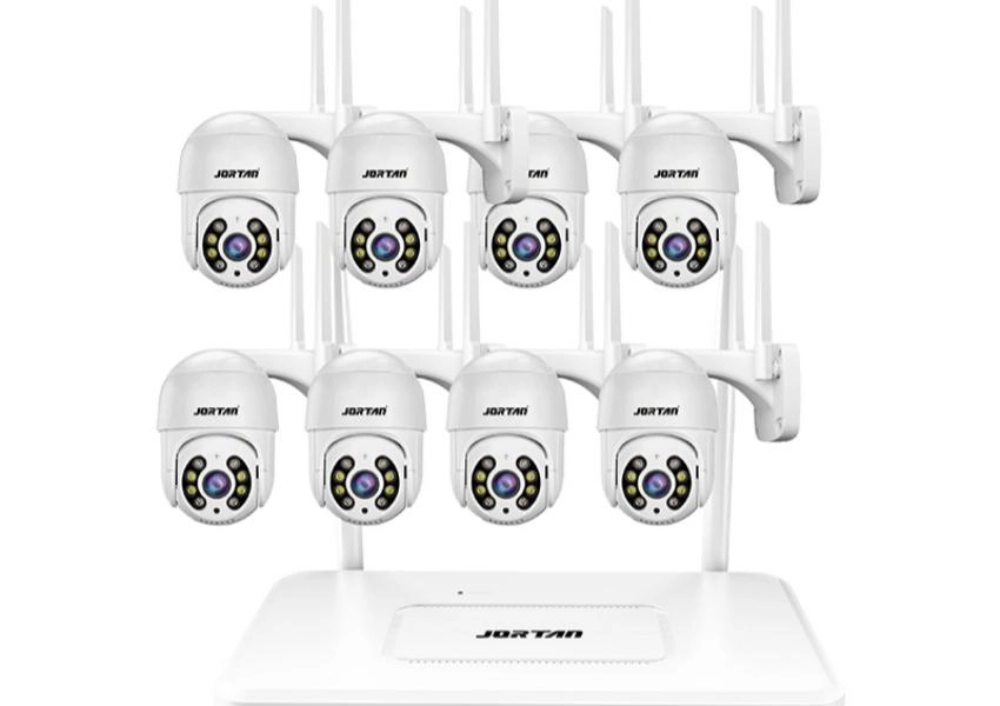
Um sistema de câmeras de segurança confiável não deve depender de um único método de conexão ou de um único local de armazenamento. Para estabelecimentos comerciais, o objetivo não é apenas manter as câmeras online, mas também preservar evidências úteis quando alguma parte do sistema ficar indisponível.
Uma abordagem multicamadas geralmente combina armazenamento local, comunicação de backup e gerenciamento de energia estável. Uma câmera com gravação em cartão micro SD pode continuar salvando imagens durante breves interrupções de rede. Um NVR (Veículo de Gravação Não Varredor) oferece armazenamento centralizado e gerenciamento mais fácil para várias câmeras. Para locais remotos, combinar conectividade 4G com gravação local cria um caminho de comunicação adicional sem tornar todo o sistema dependente de uma única rede.
A proteção de energia é outra parte importante do planejamento de continuidade. Uma câmera pode ficar offline devido à instabilidade de energia, e não a um problema de comunicação. Sistemas UPS, baterias de reserva e soluções de energia solar ajudam a reduzir o tempo de inatividade inesperado em armazéns, fazendas, canteiros de obras e outros locais onde o monitoramento constante é necessário.
Antes de uma implementação em larga escala, os compradores devem testar toda a cadeia de gravação, em vez de verificar apenas a visualização ao vivo. Pontos de verificação importantes incluem a gravação durante a perda de internet, a reconexão automática após a recuperação da rede, a sincronização precisa do tempo e o acesso aos vídeos armazenados após uma interrupção. Esse tipo de teste ajuda as empresas a escolher sistemas de câmeras de segurança que permaneçam confiáveis em diferentes condições de operação.
Como os compradores devem detectar e se recuperar de falhas sem fio
Primeiro, faça verificações simples.
Uma boa defesa é propositalmente tediosa. Ela utiliza registros de status, testes de reprodução de rotina, alimentação de reserva e etapas simples de escalonamento. Evite mudanças repentinas e precipitadas em todas as configurações. A primeira resposta deve identificar se a falha está na câmera, na fonte de alimentação, no roteador, no uplink, na conta do aplicativo, no serviço em nuvem, no gravador ou no armazenamento local.
A recuperação exige uma visão multifacetada.
Verifique primeiro a alimentação: adaptador, switch PoE, nível da bateria, carregamento solar e status do UPS. Verifique as gravações locais antes de presumir que as evidências foram perdidas. Extraia um clipe de amostra do cartão micro SD, NVR ou armazenamento local. Verifique as camadas de rede separadamente: roteador local, conexão de internet, login do aplicativo, servidor em nuvem e reprodução remota. Verifique o comportamento de recuperação: tempo de reconexão, sincronização de tempo, notificação de eventos e se a gravação é retomada sem o pareamento manual. Para compradores com várias instalações, o pacote de monitoramento A categoria pode ser usada para citar gravadores, câmeras, armazenamento e acessórios como uma cadeia de trabalho única, em vez de tratar uma câmera como um dispositivo independente.
Regras de Aquisição para Projetos de Câmeras Sem Fio Mais Seguros
Inclua os comportamentos essenciais no PO (Ordem de Compra).
Um pedido de compra defensivo deve solicitar por escrito informações básicas: modo de armazenamento, tamanho máximo do cartão, suporte a NVR, entrada de energia, processo de reconexão, versão do firmware, comportamento do aplicativo, termos da garantia e consistência entre amostras e lotes. Esses detalhes importam mais do que uma alegação exagerada sobre resistência a interferências.
A capacidade do fornecedor ainda importa.
A experiência da Jortan com produtos é útil neste caso, pois seu trabalho com câmeras de segurança para o consumidor inclui produção em fábrica, desenvolvimento de moldes, moldagem por injeção, testes, embalagem, personalização de logotipo, personalização de aparência, personalização de aplicativo e suporte à embalagem. Para compradores de marcas próprias, OEM/ODM suporte da câmera Isso pode ser discutido quando a linha de produtos precisa de uma configuração padrão estável, um guia de instalação impresso e um processo de substituição, em vez de uma amostra única que funciona apenas junto ao roteador.
Conclusão
O risco da conexão sem fio deve ser tratado como um problema de continuidade, não como um mistério. Antes de culpar a câmera, verifique se as falhas são de energia, Wi-Fi, roteador, nuvem, aplicativo, gravador e armazenamento local. Para compradores corporativos, a solução mais segura é uma combinação testada de gravação local, PoE onde o cabeamento fizer sentido, 4G onde o Wi-Fi for fraco, UPS onde o tempo de inatividade for custoso e procedimentos de recuperação documentados para os instaladores. Isso mantém as câmeras de segurança úteis mesmo quando a conexão sem fio se torna o ponto fraco.
Perguntas frequentes
P1: Um bloqueador de vídeo pode apagar vídeos já armazenados em uma câmera?
A1: Não. Interferências podem interromper a transmissão sem fio, mas não removem as gravações já salvas no cartão micro SD, NVR ou outro armazenamento local. Os compradores ainda precisam testar se a gravação continua durante a perda de rede.
P2: Uma câmera PoE é mais segura do que uma câmera Wi-Fi durante interferências sem fio?
A2: Uma câmera PoE evita a dependência do sinal Wi-Fi, pois os dados e a energia podem ser transmitidos via Ethernet quando o gravador oferece suporte a essa tecnologia. Mesmo assim, ainda são necessários cabeamento de boa qualidade, capacidade de comutação e verificações locais de gravação.
P3: As empresas devem usar câmeras 4G como backup?
A3: Uma câmera 4G pode ajudar em pontos remotos ou de difícil instalação por cabo, mas a cobertura celular, o custo do SIM, o armazenamento local, a alimentação de reserva e o comportamento de reconexão devem ser testados antes da instalação em larga escala.