A small shop, a warehouse gate, a farm entrance, and a residential hallway do not create the same recording load. The camera may look similar, but resolution, bitrate, recording mode, night activity, and playback habits can change storage use quickly.
Why Storage Runs Out Faster Than Buyers Expect
Many buyers start with card size or HDD size, then work backwards. That looks simple, but it misses the real problem. A 128GB card can last long enough in one project and feel too small in another. The difference may come from 24-hour recording, higher resolution, high bitrate, or too many false motion clips.
Storage shortage also creates after-sales pressure. When the end user asks for footage from last week and the system only keeps three days, the distributor has to explain a problem that should have been discussed before shipment.
The better approach is to ask how long footage must be kept, which scenes need continuous recording, and which clips must be available remotely. Once those answers are clear, the storage plan is easier to control.
What Usually Causes Storage Shortage
Resolution and bitrate are often underestimated.
Higher resolution creates heavier files. A 4MP or 6MP camera gives more detail than a 2MP model, but that detail has to be stored somewhere. If the bitrate is high and the project records all day, storage can disappear faster than the buyer expects.
Compression helps, especially H.265 and H.265AI on many newer cameras. Still, compression is not a magic fix. Buyers should ask for real recording estimates based on the chosen resolution, frame rate, bitrate, recording mode, and storage capacity. A number printed on a box is not enough for project planning.
Continuous recording and motion recording are not the same.
Continuous recording uses storage steadily. Motion recording depends on how much movement the camera sees. A quiet office corridor may record only a few useful clips. A farm gate, busy road, warehouse loading area, or windy outdoor scene may trigger far more footage.
This is where false assumptions cause trouble. A buyer may calculate storage based on motion recording, but the actual site may be busy most of the day. Night insects, rain, moving trees, passing vehicles, and reflective surfaces can also increase event clips.
Poor storage planning for TF cards, HDDs, and the cloud is another common reason.
Each storage method has its own weak point. TF card storage is easy for single cameras, but capacity is limited. HDD storage through an NVR gives longer recording time but needs proper installation and maintenance. Cloud storage helps remote access but depends on internet quality and service plans.
A project becomes risky when buyers choose one method without checking the site. A card-only camera may not suit a high-risk warehouse entrance. A cloud-only setup may not suit a remote farm with weak signal. A large HDD system may be unnecessary for a small indoor room.
How Different Storage Types Affect Project Planning
TF card storage for single cameras and small jobs
TF card storage is useful for indoor points, small shops, apartments, temporary sites, and cameras that do not need long retention. It keeps the system simple and avoids recorder installation. For price-sensitive channels, this can make the product easier to sell.
Buyers should still test overwrite behavior. The customer needs to know what happens when the card is full, how clips are exported, and whether the APP can find older files quickly.
A model such as Jortan’s JTZ-160B fits this kind of lighter storage planning. It is a 2MP indoor WiFi camera with Yoosee APP support, H.265 compression, and local TF card support up to 128GB. For rooms, counters, and small office use, that storage level can work when recording expectations are clear.
HDD and NVR storage for multi-camera and longer retention needs
HDD storage through an NVR is better for projects with several cameras, longer recording periods, and more formal playback needs. Shops, warehouses, offices, factories, and fixed building projects usually fit this direction better than scattered single-camera jobs. The HDD side should be calculated by camera count, recording days, resolution, frame rate, and whether the system records continuously.
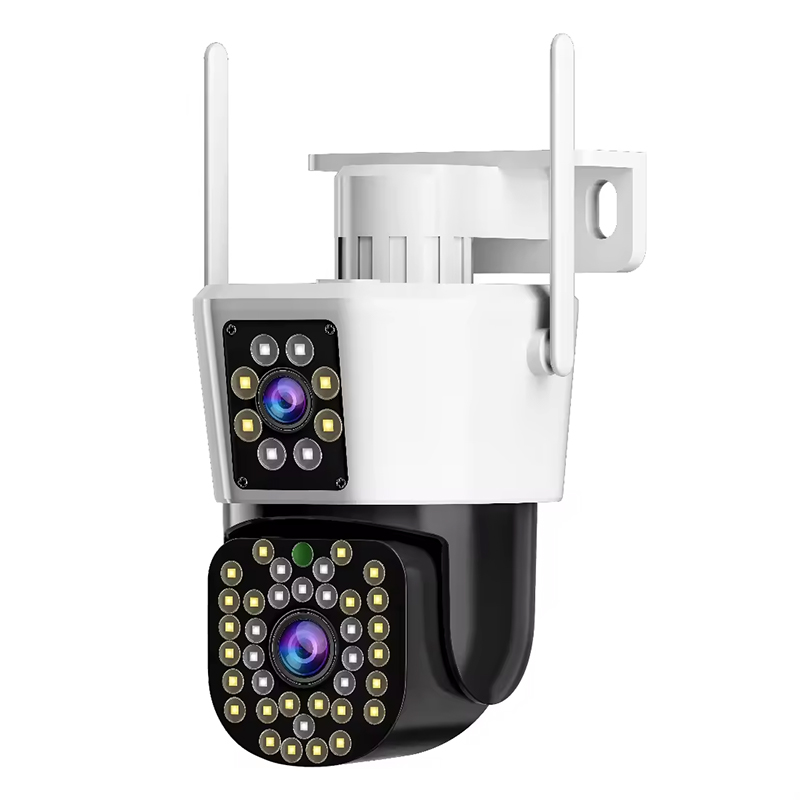
For buyers comparing mixed storage options, JT-8293QJ is a useful example because it supports Cloud, NVR, and Micro SD card storage. It also brings H.265, 2.4G WiFi plus RJ45, and local TF card support up to 256GB, which gives project buyers more room to match the same camera category with different storage habits.
Cloud storage for remote access and backup demand
Cloud storage is useful when the end user wants phone playback, remote access, branch monitoring, or evidence backup outside the device. It is also easier for some retail channels because customers do not need to manage cards or recorders directly.
Cloud is not always the easiest sale. Some markets resist subscription fees. Some projects have unstable networks. Buyers should confirm APP language, account setup, upload behavior, playback period, and payment method before building a cloud-first product line.
What Buyers Should Confirm Before Bulk Orders
- The first question is not card size. It is retention time. Does the customer need three days, seven days, fifteen days, or one month of footage? Is the camera recording continuously or only on events? Is the scene quiet, busy, or unpredictable?
- Samples should be tested with the same resolution, bitrate, night mode, and motion settings planned for bulk orders. If the test is done in a quiet office but the product will be installed at a warehouse loading bay, the estimate will be too soft.
- Card capacity should match the camera position. A 128GB TF card may be fine for indoor event clips. Outdoor PTZ cameras or high-resolution models may need 256GB or a different storage path. HDD size should be calculated for the number of channels and recording days, not chosen from the cheapest kit.
- Cloud plans also need clear wording. Buyers should confirm whether the service stores continuous video or event clips, how long files stay available, and whether the end user can download evidence easily. If those details are vague, the distributor may inherit the complaint later.
- Playback should be checked before a large order. The APP must load clips quickly, show dates clearly, and export evidence without confusing the customer. Overwrite behavior should be explained in the manual and sales material, especially for TF card products.
For private label buyers, Jortan OEM/ODM camera customization can help align logo, packaging, APP-related requests, assembly, and inspection with the actual storage setup. That matters because packaging claims, manual wording, and product configuration must match. Otherwise, a simple storage question can become a return problem.
Buyers planning a broader camera line can also use Jortan security camera products to compare indoor WiFi cameras, outdoor PTZ models, and dual-lens options before deciding which storage package belongs to each channel.
FAQ
Q1: Is TF card storage enough for most small projects?
A1: Yes, if the camera is used for a single indoor point, small shop, apartment, or light event recording. Buyers should still confirm card quality, overwrite behavior, APP playback, and expected recording days before placing bulk orders.
Q2: When should buyers choose HDD instead of cloud storage?
A2: HDD storage is better for multi-camera sites, longer retention, and projects where internet stability is uncertain. Cloud storage makes more sense when remote access and off-site backup are the main selling points.
Q3: Can Jortan support storage-related OEM or ODM orders?
A3: Yes. For storage-related OEM or ODM work, contact Jortan to confirm card capacity, cloud function, NVR compatibility, APP requirements, packaging wording, and sample settings before production.